


LINE: Calls & Messages
3.1234.15K Reviews
App Specs
- Version
- Varies with Device
- Updated On
- License
- Free
- Downloads
- 1,000,000,000+
- Developer
- LINE (LY Corporation)
- Categories
- Communication
- Platform
- Android, iOS
Screenshots






 Analysis by AppCompare
Before choosing any chat app, I would first ask whether the people I need to reach already use it. A messenger is only useful when it connects the right people, and that matters more than a long feature list. LINE: Calls & Messages is most compelling when it is already part of a family, friends’ group, or community’s routine; it is harder to justify as yet another app if everyone you know prefers something else.
What the free price does—and does not—tell you
LINE is free to download, so trying its basic communication experience does not require an upfront purchase. The app is made by LINE (LY Corporation), is rated for Everyone, and has been available since June 23, 2011. It has an average rating of 3.3 from around 14 million ratings, with roughly 241,000 written reviews and over one billion installs. Those figures suggest broad familiarity, but they do not guarantee that its mix of features will suit your habits.
There are in-app purchases, with listed item prices ranging from $0.29 to $394.99. I would treat that as a reason to check the purchase screen before tapping, not as proof that you need to pay to message or call. Free access and paid extras are different questions: the former makes it easy to give the app a try, while the value of any optional purchase depends on what it offers and whether you personally want it. I would not budget for extras just to test whether LINE works for your circle.
Guides and Analysis on LINE: Calls & Messages
Where LINE earns its place on a phone
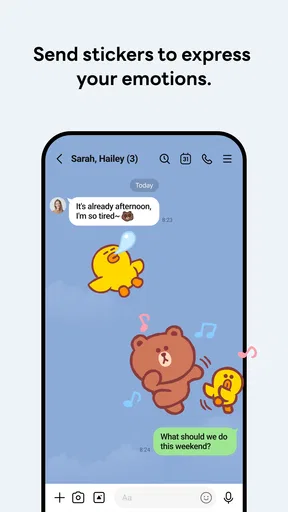
The strongest case for LINE is that it brings several kinds of interaction together. Text conversations can lead into voice or video calls, and stickers give chats a more expressive feel than plain messages. In practice, that can be useful for a family that shares quick updates during the day but also wants a simple way to have a longer conversation without switching apps.
Its social features also change the feel of the app. The original article’s experience describes Timeline posts and group polls, which can make LINE useful for keeping up with friends and making a shared decision in one place. A poll is a practical alternative to a long chain of “Which time works?” replies; a quick vote can narrow down plans without requiring everyone to install a separate planning tool.
The trade-off is that an all-in-one layout can feel busier than a messenger built mainly around private chats. If I want a quiet inbox and nothing else, social posts, games, news, stickers, and payment-related areas may be more than I need. The best value comes from using the parts that genuinely serve your routine rather than treating every section as essential.
Small habits that make group conversations easier
For a group planning a meal or outing, I would keep the discussion and decision in the same chat: settle the options in messages, then use a poll if the group is going in circles. That workflow is more useful than sending a poll immediately, because people can first explain practical constraints such as timing or location. It also leaves the decision in context for anyone who checks the chat later.
Worth Reading Before You Choose

Baby Panda World Brings Quick Play to Modern Phones, but Its Game Library Feels Busy

ESPN’s Live Game View Makes Following Close Games Easier

QuizzLand Review: A Good Fit for Short Trivia Breaks, Not Every Player

Basketball Stars: Multiplayer Is Fast, but Can It Recover When Matches Go Wrong?

WEBTOON Turns Phone Updates Into a Better Reading Routine

Link to Windows Runs on Shared Habits, Not Social Feeds
Stickers can be more than decoration when a conversation is moving quickly. A reaction-like visual reply can acknowledge a message without adding another line of text, though I would still use plain words when the detail matters. If you make or collect stickers, they can give recurring group jokes a familiar shorthand; if you rarely use them, they are easy to ignore rather than a reason to buy anything.
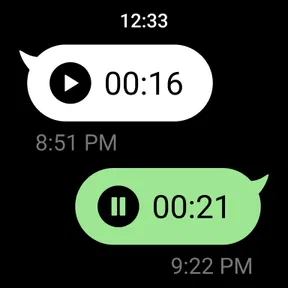
For calls, I would use LINE when the other person is already reachable there and agree on a time if either of us may be moving between networks. That is sensible with any internet calling app: audio or video quality can depend on the connection at both ends, so a smooth call in one situation is not a promise that every call will be equally clear. If reliability is critical, keep an ordinary phone call or another agreed method as a fallback.
Privacy features need deliberate use
The published experience describes end-to-end encryption and Hidden Chat with messages that disappear after a chosen period. Those tools can be useful, but they do not remove the need to think before sending something sensitive. A disappearing message is not a substitute for checking who is in a conversation, and I would confirm the chat mode and its behavior before relying on it for a particular exchange.
That distinction matters because convenience can encourage people to share more casually. I would reserve a disappearing-chat option for a clear purpose, rather than assume it makes every conversation risk-free. For everyday logistics, a normal chat is usually simpler; for anything consequential, I would also consider whether a messaging app is the right place to store or discuss it at all.
Who should choose it, and who should pass
LINE is a natural candidate if your close contacts already use it, you like expressive sticker-heavy chats, or your group benefits from combining conversation, calls, social updates, and polls. It can also suit someone who wants to try a communication app without paying upfront and decide later whether optional purchases have any personal value.
I would skip it if your contacts are settled on another messenger and have no reason to switch. Asking everyone to maintain one more inbox can create fragmented conversations, missed replies, and duplicated notifications. A simpler alternative may be better when your only need is plain messaging or calling, especially if the people you talk to already share a different app.
Compared with a basic chat service, LINE’s appeal is breadth; compared with a social network, its advantage is keeping group conversation close to the activity. That blend is also its main compromise. Someone who wants a minimal messenger may find the extra surfaces distracting, while someone who enjoys a more social chat space may see them as useful. I would choose based on the habits of the people I talk to, not on the number of features in the menu.
For a realistic everyday example, imagine coordinating a family visit. One person sends the proposed time, another asks about the location, and the group uses a poll to settle between two options. A relative who cannot type much can join by call, while a sticker can acknowledge the final plan without reopening the debate. This works best when everyone is already comfortable in LINE; otherwise, the same coordination may be easier in the group chat they already check.
Getting Started with LINE
Installing LINE: Calls & Messages on my Android was a breeze. A quick trip to the Google Play Store, a tap on the install button, and voila! The app was ready to go in under a minute. Once installed, it greeted me with a clean and straightforward interface. Signing up was as simple as entering my phone number and confirming it via a text message. I was in!
Features That Stand Out
One of the first things I noticed about LINE is its rich feature set. It’s not your average messaging app. Sure, you can send texts, but there’s so much more. Voice and video calls are just a tap away, and the quality? Pretty darn impressive. I’ve had calls with friends in different time zones, and the audio was crystal clear with minimal lag.
But wait, there’s more! The app offers a plethora of stickers and emojis that add a fun twist to conversations. It’s like having a personal sticker shop in your pocket. And if that wasn’t enough, you can even create your own stickers. I spent a good hour crafting a sticker of my dog – totally worth it!
Staying Social
What I really love about LINE is how it integrates social elements. It’s not just about chatting; it’s about staying connected in multiple ways. The app has a feature called Timeline, where you can post updates, photos, and videos. It feels a bit like a social media platform but within a messaging app. I found myself scrolling through friends’ posts and leaving comments, much like I would on Facebook or Instagram.
The Group Chats feature is another big plus. Organizing meetups or just having a casual group conversation is super easy. You can even create polls within the chat to make decisions as a group. We used it to decide on the restaurant for our next outing – super handy!
Privacy and Security
In today’s digital age, privacy is key. LINE takes this seriously with end-to-end encryption for all messages and calls. I felt a reassuring sense of security knowing my conversations were protected from prying eyes. The app also offers a Hidden Chat feature, which automatically deletes messages after a certain period. It’s perfect for those sensitive conversations.
Additional Features Worth Mentioning
For those who like to explore, LINE has a few hidden gems. There’s LINE Pay for easy money transfers and payments, and LINE Today to catch up on the latest news. I found the news section particularly useful – it’s like having a mini news portal within the app.
“LINE is more than just a messaging app; it’s a lifestyle app.”
And, if you're into games, LINE has a whole section dedicated to LINE Games. It’s a fun way to kill some time, and the integration is seamless. You can invite friends to play, making it a social gaming experience.
Final Thoughts
Wrapping it up, LINE: Calls & Messages offers a comprehensive package that goes beyond just messaging. With its rich features, social connectivity, and emphasis on security, it’s a solid choice for anyone looking to keep in touch with friends and family. Whether you’re chatting, calling, or just catching up on the latest news, LINE has you covered. So, if you haven’t tried it yet, give it a whirl – you might just find it’s exactly what you need!
My practical recommendation is to start with the free app and use only the conversations and tools your circle actually needs. Notice whether your friends respond there, whether group planning feels easier, and whether the additional social sections help or distract you. The average rating and huge audience are useful context, but neither settles that personal question. I would keep it if LINE becomes a natural meeting point for my contacts; if it becomes one more place to check, I would stick with the messenger my group already uses.
Pros
- Easy-to-use interface for all ages.
- High-quality voice and video calls.
- Large collection of fun stickers.
- Seamless cross-platform support.
- Group chats with up to 500 people.
Cons
- Ads can be intrusive at times.
- Stickers may incur extra costs.
- Requires stable internet for calls.
- Some features are region-specific.
- Limited customization options.
FAQs for LINE: Calls & Messages
What features does LINE: Calls & Messages offer?
LINE provides a comprehensive suite of features including free voice and video calls, instant messaging, and a vast selection of stickers and emojis. The app also supports group chats, LINE Out for international calls at competitive rates, and a timeline feature to share updates with friends. Additionally, it offers various entertainment and lifestyle services through its platform.
Is LINE secure for personal communication?
Yes, LINE takes user privacy and security seriously. It employs end-to-end encryption for chats and calls, ensuring that only you and the person you're communicating with can read or listen to the content. Users are also encouraged to enable additional security measures like two-step verification for enhanced protection.
How does LINE compare to other messaging apps?
LINE stands out due to its extensive sticker and emoji library, appealing to users who enjoy expressive communication. While it offers similar features to apps like WhatsApp and Messenger, LINE also integrates unique services like LINE Pay for mobile payments and a timeline feature for social sharing, making it a versatile platform for more than just messaging.
Can I use LINE on multiple devices?
While LINE is primarily designed for use on a single smartphone, it does offer a PC and Mac version for desktop use. However, your account is tied to your phone number, making it challenging to use the same account across multiple phones. For seamless use, ensure that you regularly back up your chat history, especially when switching devices.
Is LINE available worldwide?
Yes, LINE is available globally and can be downloaded from the Google Play Store and Apple App Store. However, certain features like LINE Out (for calling landlines and non-LINE users) and specific stickers might vary depending on your region. Be sure to check the availability of services in your area to fully enjoy all features LINE offers.


